|
Preparing Digital Images for the Projected Image Competitions
Submission of Work
Images can be submitted on CD, DVD, usb pen or by email to digital@alnwickcameraclub.org.uk
The CD/DVD/USB must contain only images for the specified competition.
The competition entry slip should be included with the CD/DVD/USB pen
Email entries. Please identify clearly your name, the filenames and titles of the images in the email and attach the images to the email
CD and DVDs will not normally be returned.
For the image to be projected correctly it must be saved on the CD with...
- the correct file size and format
- the correct file name
- a title and author
File Size and Format
Resizing images in Photoshop
Open the image and go to
IMAGE > RESIZE > IMAGE SIZE
Format
All images must be prepared in JPEG format with a maximum pixel dimensions of 1920 (width) x 1200 (height). *Constrain Proportions box must be ticked
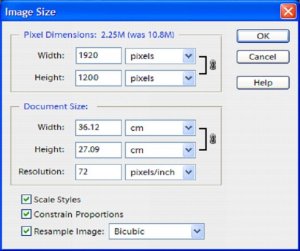
- Landscape. Set the width to a maximum of 1920 and the height will change itself
- Portrait. Set the height to a maximum of 1200 and the width will change itself
- YOU DO NOT HAVE TO CHANGE THE RESOLUTION, ANY NUMBER WILL DO
Saving the Image
Go to FILE MENU and click on SAVE AS
Save the image with a suitable file name (see next section below) and check that the Format is JPEG.

Click SAVE and the following box appears
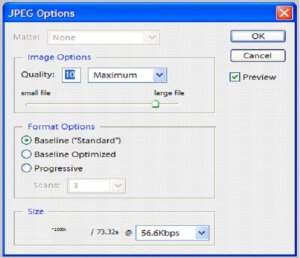
Click on OK
File Name
No spaces between the characters
Use BLOCK CAPITALS and use the naming convention as shown in the example below:
ACCRS50P1-S1
The filename contains the following elements and has been chosen for the reasons shown.
- ACC = Alnwick Camera Club
- RJS50* = members initials/membership number
(*This Competition Entry Number is on the camera club website and is also available from Peter Sutcliffe) - P1 = Panel 1
- S1 = Slide 1
For example, if I was submitting three images for an open or set subject competition they would have filenames ACCRS50P1-S1, ACCRS50P1-S2 and ACCRS50P1-S3. The images would be projected randomly with the other competition entries. If there is a very large entry, your third image (ACCRS50P1-S3) may be dropped from the competition.
If I was submitting three images for a set of three competition, they would have filenames ACCRS50P1-S1, ACCRS50P1-S2 and ACCRS50P1-S3. This is the same numbering system but the panels would be projected randomly and the images would be projected in the order ACCRS50P1-S1, ACCRS50P1-S2 and ACCRS50P1-S3
A full list of identifiers is available in the members' area of the website
Title and Author
Windows
This can be done in using your Windows Browser
Open the image
With the cursor over the image click the right mouse button and a menu will appear
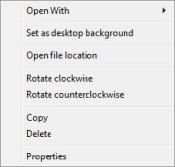
Click the left mouse button on Properties and the following menu will appear
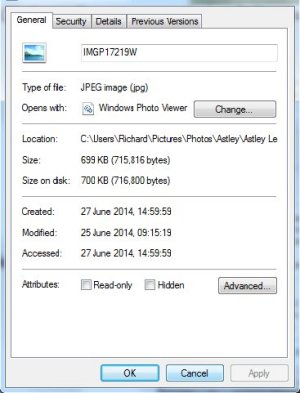
Click on Details and the following will appear.
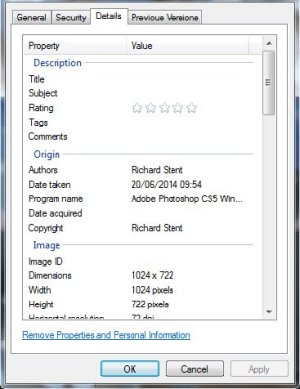
Enter a Title and the Author then click on OK
Using Bridge
Open the folder containing your competition images.
Right click on the chosen picture, choose “File info”
In the Basic section fill in the Document title with your chosen picture name, then add your name as author.
Click OK.
Right click again and choose 'Rename'
Rename your image with the required competition details. Eg. ACC,your initials and number, P1-S1/2/3.jpg.
Alternately click on File, File info and complete details as above.
In Photoshop
With your picture open click on File, File info, Basic.
Type in details of your title and author name. OK
Re-name your image with the competition details when you click Save as Jpg.
Website © 2007-2026 Alnwick & District Camera Club
Copyright on photographs belongs to the photographer